
Run exams on site
SmartExaminer Computer-based tests in your own hall, on your own network.
Built for secondary schools, colleges, universities, training centres, testing bodies and organisations. This page answers the questions in the order you will probably ask them: what it does, what it runs on, what it costs, what you install, and what happens when something goes wrong.
₦250,000 for the Starter licence — 50 connections at once. The plan table is below; every other application in the suite is free.

- 01 One installation, on the server — client machines need no install of their own
- 02 Thousands of candidates on one local network, with no internet at all
- 03 A candidate who loses power resumes on the same question, with time intact
- 04 Windows, Mac, Linux and Solaris
- 05 Marking finishes when the last candidate submits
Who it is for: Secondary schools, colleges, universities, training centres, testing bodies and organisations.
- Starfield College
- Doveland High School
- Spring Leaders Secondary School
- Computer Training School, NNS Quorra
- Edge Lane School
- BrookStone School
What it does
Any room with computers becomes the hall. Nothing leaves the building.
SmartExaminer turns any room with computers into an examination hall. It runs on a server you control, on a network that never has to leave the building, so a dropped line or an exhausted data bundle cannot stop a paper that has already started. Version 4 is an eight-application suite for schools, training centres and organisations, and it installs once — on the server. Candidate machines pull the client from it, so there is nothing to install on four hundred desks.
-
Design the paper once
Build question banks by subject and topic, then let SmartExaminer draw a different paper for every candidate from the same bank. Randomised order, randomised options, several subjects in one sitting. Four question types ship today: multiple choice single select, multiple choice multiple select, fill in the blanks, and select and place — the drag-and-drop type built with the Canvas app.
-
Install once, on the server
SmartExaminer needs one installation, on the server machine. Every client pulls the application it needs from the server, so no candidate computer is ever installed on, imaged or updated by hand. Add more candidates while an exam is already running and the sitting stretches to fit them.
-
Deliver it anywhere
Candidate machines connect to your server over the school LAN. No public internet is involved at any point in a sitting, which is why it works in a hall where nothing else does. The suite has been run on Windows, Mac, Linux and Solaris, so a lab does not have to be standardised before you can use it.
-
Survive the power cut
Answers, the current question and the time remaining are written as the candidate works. When a machine comes back up the candidate signs in and continues from exactly where the lights went out — on that machine or on another one. Exam files back up and restore to a consistent state from a single button, to a drive or a disk.
-
Close the ways out
The client starts from a browser and then pulls itself out of it, so closing the browser does nothing, and it refuses to be closed while an exam is running. Questions are encrypted at rest, accounts carry permissions, and the Manager is notified of repeat connection attempts.
-
Watch the hall
On a subscription the Manager can monitor and capture candidate screens and webcams live, push a command to every client at once, and stop the exam for one candidate or for everybody. Client commands can throw each candidate's registered photograph and details onto their own screen — the window will not close until the Manager closes it, and the candidate keeps working while it is up, so an invigilator can walk the row and check faces against records.
-
Stop the second sitting
If a candidate who is already connected signs in from another machine, the second connection is refused and reported. Where machines are tagged, the Manager is told which PC tried and which one holds the live session. Exam start permissions go further: on a wireless network a candidate could otherwise start from outside the hall, so approval is granted per candidate as they arrive, and an unapproved start is denied on the client and reported to you.
-
Report on anything
Reports can be generated from any table in the application, with SQL-like advanced filters for the awkward questions, custom titles and blank columns you can write in. Export to Excel or PDF. Print one as the exam attendance sheet. Connection reports show who connected, from where and when, and which connections the security rules turned away.
-
Results before the hall empties
Objective papers are marked on submission. Scores, per-topic analysis, graphical statistics and rank lists come out without anyone retyping a number — and on a subscription they can be handed straight to SmartSkool, so a school generates the term's result sheets the same day the exam was written.
-
Let teachers write their own
Several Manager installations can connect to one application server, and every teacher can build their own bank in the Designer. From version 3.0.3 the Designer imports questions straight out of Microsoft Word, keeping formulas, tables and images; audio files attach to questions for listening papers.
What you actually install
Eight applications. One installation.
SmartExaminer is a suite. Each application does one job, and you can install them together or one at a time — on the server, where the others are pulled from.
-
Application Server your hardware · your LAN
The glue between everything else, providing the web and database access the other applications run on.
-
Designer
Builds the questions. Imports from Word, handles passages and case studies, expression templates for mathematics, and audio.
-
Manager licensed
Runs the sitting: examinees, groups, exams, invigilation, reporting. The only application in the suite that needs a licence.
-
Client
What the candidate sits in front of. Pulled from the server, not installed on the desk.
-
IAM
Identity and access management, with fingerprint biometrics for approving a candidate to start.
-
Inspector
The fail-safe. For the extreme, unforeseen circumstance on a client machine that nothing else covers.
-
Launcher
Starts the client and handles application updates gracefully, so a lab does not need touching between versions.
-
Canvas
The design tool behind the drag-and-drop question type, and available to the others for custom graphics and shapes.
What it costs
One licence, priced by how many sit at once.
Every application in the suite is free except the Manager. Licensing is by connection — how many candidates may be sitting at the same moment — and by installation, meaning one server computer. One Manager installation can run thousands of client machines.
- The Manager is the only application that needs a licence
- A connection is one candidate sitting at one time, not one machine you own
- Pricing is per installation: one server computer
- Custom is the same one-off licence with the number of connections chosen by hand, not a smaller feature set
- Subscription is available from version 3 onwards; one-off applies to version 2 and below
| Plan | Starter 50 connections | Professional 100 connections | Advanced 200 connections | Custom per connection | Subscription per connection, per year |
|---|---|---|---|---|---|
| Price | ₦250,000 | ₦500,000 | ₦1,000,000 | ₦5,000 | ₦3,600 |
| One-off payment | Yes | Yes | Yes | Yes | No |
| Free version updates | Yes | Yes | Yes | Yes | Yes |
| Upgrade to a new version | No | No | No | No | Yes |
| Backward compatible | Yes | Yes | Yes | Yes | Yes |
| Maximum connections | 50 | 100 | 200 | As many as you buy | As many as you need |
| Support | Email and community | Email and phone | Email, phone and remote | To match the connections you buy | Email, phone and remote |
| Video tutorials | Yes | Yes | Yes | Yes | Yes |
| Question types | 2 | 2 | 2 | 2 | 3 and up |
| Audio-enabled questions | No | No | No | No | Yes |
| SmartSkool integration | No | No | No | No | Yes |
| Live screen monitoring | No | No | No | No | Yes |
| Off-site question authoring | No | No | No | No | Yes |
| Stop exam command | No | No | No | No | Yes |
| Email response | 24–72 hrs | 24–72 hrs | 24–72 hrs | 24–72 hrs | Under 24 hrs |
- Subscription is billed annually and requires version 3 or above.
- One-off plans receive updates within the same major version; moving to a new major version is a new purchase.
- Off-site question authoring is about writing questions, not sitting an exam. The exam itself still runs on your own server, over your own network, with no public internet involved.
There is a plan above the table for institutions running at that scale. It includes a year of phone and remote support, and on-site training and setup. Talk to us and we will size it with you.
Installers are free to download and every application except the Manager stays free. A licence is bought once you have seen a sitting run; tell us the size of your hall and we will say which plan fits.
The reasoning
How it holds up when you look closer.
The claims above, with the mechanism behind each one — the part a brochure leaves out and an ICT officer asks about first.
What a subscription adds
Versions 3 and 4 are subscription-activated, and the subscription is where the newer capability lives. Version 2 and below were one-off purchases and stay on the features they shipped with.
- Two more question types: multiple choice multiple select, and drag and drop
- Audio-enabled questions for listening exercises
- Live screen and webcam monitoring, with commands pushed to clients
- A stop-exam command for one candidate or the whole hall
- Scores handed to SmartSkool automatically after each exam
- Graphical reports and per-exam statistics
- Question import from Microsoft Word, with formulas, tables and images
- The Canvas design tool, new in version 4
- Question authoring from off site, in a browser — the sitting itself still runs on your own network
- Every future version, at no extra cost
Installing it
Install the Ratelsoft Applications Server first, then the SmartExaminer Client, then whichever of the others you want. The Manager and the application server can sit on different machines and work perfectly well; put them on the same machine if speed matters more than tidiness.
- Any modern computer or laptop can be the server
- Minimum 2 GB RAM — 4 GB for version 3 — a 2.0 GHz dual core, 3 GB free disk
- The Manager is the only licensed application; the rest are free
- Deactivate the Manager before formatting or anything else destructive, then reactivate it afterwards
Learning it
SmartExaminer is a large application and it rewards being shown around. There are tutorial video playlists for the Designer and for the Manager and Client on our YouTube channel, a user forum, and training we run either remotely or on your site. Ask us for the latter — it is often the fastest route to a first live sitting.
Say what you are running and how many people it has to serve, and we will answer from the software rather than from a slide.
The numbers
What it needs, what it weighs, what it covers.
So you can plan before you talk to us rather than after — the version, the size of the download and the machine it has to run on.
- Current version
- 4.0.0
- Download
- 481 MB, Windows installer — the four main applications in one
- Platforms
- Windows, Mac, Linux, Solaris
- Server minimum
- 2 GB RAM (4 GB for version 3), 2.0 GHz dual core, 3 GB free disk
- Client machines
- No installation — the client is pulled from the server
- Internet
- Needed once, to activate the licence. Never during a sitting.
- Licensed application
- SmartExaminer Manager only
- Earlier versions
- Every release from version 2 onwards is still downloadable
What it looks like
The two screens people ask to see.
Invigilation and question design — the parts of SmartExaminer that are hardest to picture from a description.
-
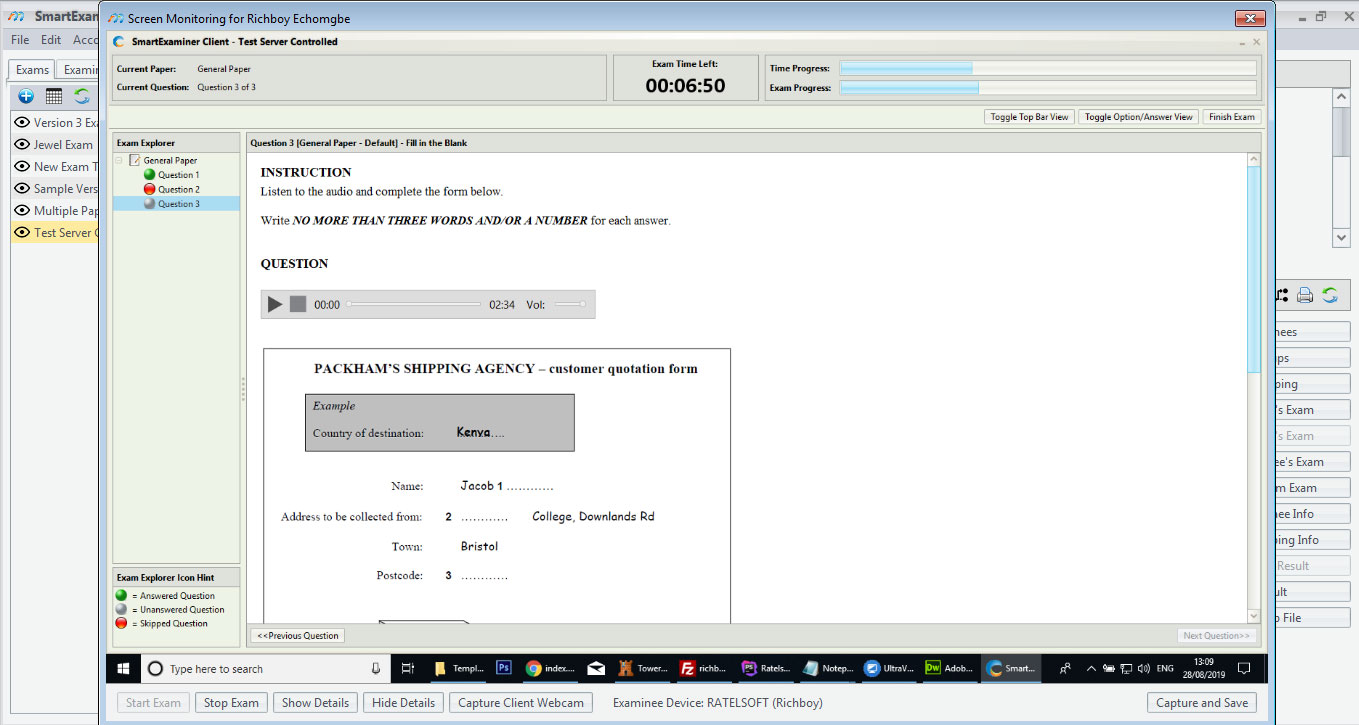
Live screen monitoring An invigilator watching one candidate’s screen from the Manager, mid-paper, with the time left and the exam progress beside it. Start exam, stop exam and capture the client webcam sit on the same bar. -
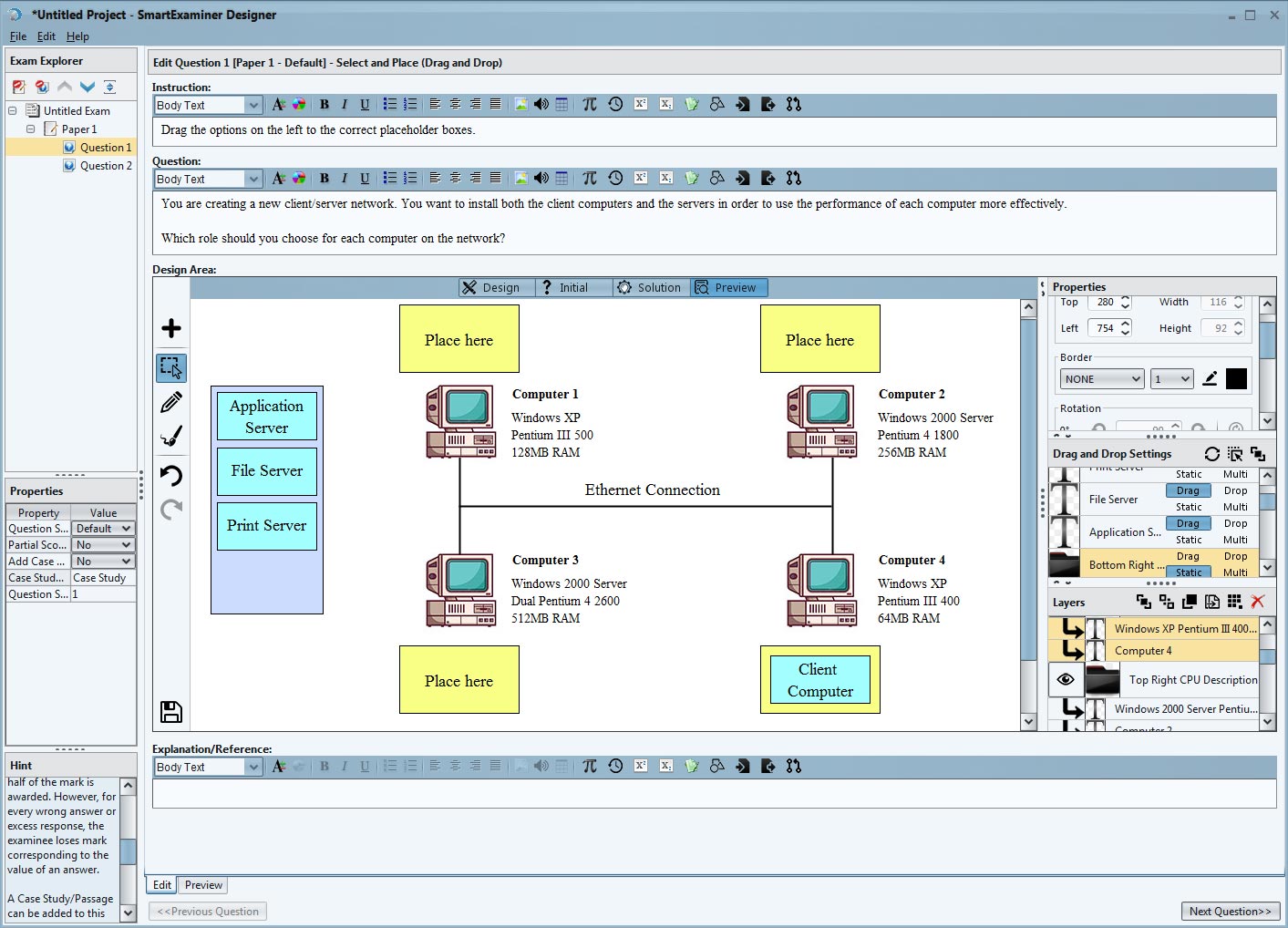
Drag-and-drop questions in the Designer A select-and-place question being built: the candidate drags each role onto the right machine. Partial scoring, a hint and an explanation are set on the same screen.
Two ways to buy it
Buy the connections once, or subscribe by the year.
Which of the two you can buy is decided by the version you run, not by the size of your order. Version 2 and below is a one-off purchase: you pay for the connections once and the licence never expires. Version 3 and version 4 are sold as an annual subscription, priced per connection for a year at a time. They are not two prices for the same thing — one of them ends.
- Both structures are priced per connection — one candidate sitting at one time, not one machine you own
- One-off is for version 2 and below; subscription starts at version 3
- Either way the price is per installation: one server computer, however many client machines connect to it
₦5,000 per connection, once
You pay for the connections once. The licence does not expire and there is nothing to renew.
-
50 connections the Starter plan, paid once ₦250,000
-
100 connections the Professional plan, paid once ₦500,000
-
200 connections the Advanced plan, paid once ₦1,000,000
Any other number is the same rate. The three named tiers are the common sizes, not the only ones — order the count your hall seats.
₦3,600 per connection, per year
A term runs for one year from the day you activate it, and includes the move to a new major version while it is running.
-
50 connections for one year ₦180,000
-
100 connections for one year ₦360,000
-
200 connections for one year ₦720,000
The same three sizes as the column beside it, so the two structures can be read against each other in money and not only in words.
Buying happens in your account. If you are not signed in you will be asked to sign in first and taken straight back to it. Activation codes are delivered to the address on your account, so it has to be one we can reach.
Buy now handles any number of connections in either structure. What it cannot do is raise a purchase order against your bursary, put a school's own reference on an invoice, or price a rollout across several centres in one conversation. Write to sales for those and a person will do it with you.
- A one-off licence receives updates within the same major version. Moving to a new major version is a new purchase.
- A subscription includes the move to a new major version for as long as the term is running.
- The Manager is the only application in the suite that needs a licence. Every other application, and every installer, is free.
Learn SmartExaminer
Watch someone do it first.
SmartExaminer does a great deal, and it is quicker to watch a sitting being built than to read about one. These playlists cover the whole job, from writing the first question to running the hall on the day.
-
 The paper
Designer
Writing questions, importing them from a file, and assembling the paper.
Watch on YouTube
— Designer playlist, opens in a new tab
The paper
Designer
Writing questions, importing them from a file, and assembling the paper.
Watch on YouTube
— Designer playlist, opens in a new tab
-
 The sitting
Manager and Client
Setting up the server, admitting candidates, and running the sitting itself.
Watch on YouTube
— Manager and Client playlist, opens in a new tab
The sitting
Manager and Client
Setting up the server, admitting candidates, and running the sitting itself.
Watch on YouTube
— Manager and Client playlist, opens in a new tab
-
 Earlier releases
Manager and Client — older versions
The same ground for schools still running an earlier release.
Watch on YouTube
— Manager and Client — older versions playlist, opens in a new tab
Earlier releases
Manager and Client — older versions
The same ground for schools still running an earlier release.
Watch on YouTube
— Manager and Client — older versions playlist, opens in a new tab
All tutorials on YouTube (opens YouTube, a separate site, in a new tab)
Subscribe and YouTube will tell you when a new one goes up — most of them exist because somebody asked for them.
Need them where there is no connection? Ask us and we will send the videos to download.
We also run training, remotely or at your school. Ask about training.

Also from Ratelsoft
Want to host secure assessments online? examina.io is all you need.
examina.io is fully compatible with SmartExaminer and offers live exam proctoring and facial recognition. It runs entirely in the cloud, so there is nothing to install and no server to keep. Create questions from anywhere and visit examina.io to get started.
SmartExaminer sittings continue to run offline, on your own network, exactly as they do today. examina.io is a separate product on its own domain, for the assessments you want to hold online.
- hall SmartExaminer — the sitting runs on your own server, over your own network, with no public internet at any point
- away examina.io — candidates at home or across several centres, in the cloud, on its own site
- watch examina.io adds live exam proctoring and facial recognition for candidates nobody is in the room with
- both examina.io is fully compatible with SmartExaminer, so a school that runs the hall version is not starting again
Two products. One is not a newer version of the other.
When something goes wrong
Questions we get asked.
And the answers we give, in the words we would use on the phone. If yours is not here, it reaches a person.
01 Does SmartExaminer need internet?
Not to run an exam. It needs a connection once, to activate your licence, and after that a sitting runs entirely on your own network.
02 How many candidates can sit at once?
As many connections as your licence covers. Schools routinely run several hundred on a single server, and one Manager installation can manage thousands of client computers; the practical limit is your network and your machines, not the software.
03 What happens if a computer dies mid-paper?
The candidate moves to another machine, signs in again, and picks up on the question they were on with the time they had left.
04 What question types are available?
Four: multiple choice single select, multiple choice multiple select, fill in the blanks, and select and place — the drag-and-drop type. Multiple select needs version 3 or above; select and place needs version 4.
05 I already have my questions typed in Microsoft Word. Can I use them?
Yes, from Designer 3.0.3 onwards, and the import keeps formulas, tables and images. On older versions you would retype them into a plain text file or WordPad in the format the Designer reads, and add images afterwards.
06 How do I build a comprehension or passage question?
Select the question in the Designer and set "Add Case Study/Passage" to Yes in the Properties panel. The passage then carries across every question you attach to it.
07 How do I build mathematical questions?
Use the built-in sample expression templates, or build the expression in Word and import the question. Screenshotting the expression and adding it as an image also works and is sometimes quicker.
08 Can I delete a lot of examinees at once?
Put them in a group and use Delete Group Examinees. Deleting the group itself does not delete anybody — only that button does. From version 2.1.5 you can add many examinees to a group at once, and from version 3 you can match existing examinees from a file on full name, examinee ID or an extra field, or send the results of a report straight into a group.
09 Do I pay again when a new version comes out?
Not on a subscription — updates and new versions are included. Versions 1 and 2 were one-off purchases and receive updates within the same major version only.
Say which product, which machine and what it said. Most questions are one of the ones here; the rest we would rather hear about before the day than on it.



Judge the software, not the slide
Download SmartExaminer.
Then try it on your own machines.
Installers are free to download and a licence unlocks them. Tell us what you are running and how many people it has to serve, and we will say which licence fits — from the software, not from a brochure.
Or compare the whole family first.